Showing posts with label mobile apps. Show all posts

Sunday, 17 April 2016

Gamification at #BbTLC16

Earlier this month I was at #BbTLC16 - the annual Blackboard Teaching & Learning conference, which took place in Groningen this year. I've been meaning to write a couple of blog posts about it, and what I learned there, but have been so busy since I got back! That's the downside of being at a conference, work just piles up and waits for you to return.


One of the interesting features of the conference this year was the use of the mobile app, which we were encouraged to download prior to the event.

As well as easy access to the programme, and the ability to build up a personal agenda, there were a couple of other features that added to conference experience (positive and negative) and ultimately had an affect on my behaviour as part of the backchannel, as well as others.

Mobile Agenda

There was (initially) no printed programme available at the conference. The online programme was a little tricky to navigate, with up to 6 parallel sessions each day, and I certainly didn't pay it much attention before travelling. So it was extremely useful to be able to browse the programme using the app. Each session had a very short description, or you could browse by speaker, and add talks of interest to a personal agenda. If you allowed notifications, you would even get a reminder when a particular talk was about to start. With my increasing reliance on online calendars, this proved to be a very useful feature.

This is where the gamification starts. Once in a particular session, you then had an option to "check-in", allowing you to collect points. When a session finished, you were presented with an option to rate (out of 5) and make comments on the talk. Each of these activities allowed you to collect further points. It's not entirely clear where the ratings and comments went - but presumably the conference organisers are using them in some way. As a speaker, I certainly have not seen any feedback on our presentation.

Community

On first accessing the app, I was encouraged to create a profile, linking it to my LinkedIn, twitter and/or Facebook accounts. I used the opportunity to link to LinkedIn and twitter, but my Facebook activity is much more personal.

Within the app, it was possible to browse all Attendees (and separately all Speakers), including Blackboard personel and other sponsors, thus finding out a little more about them, and also see what networks they had shared. This was very useful for following up on new acquaintances, leading to some new LinkedIn connections and Twitter followers.

Activity

Now things start getting interesting! One of the main features, once the conference started, was the activity feed. Like a conference twitter feed, users of the app could post updates, with links, pictures and videos. We could also "like" posts and even comment on them. Before long, we realised that we could earn badges by posting, commenting, rating, checking-in. I managed to get 22 out of 27 possible badges!

Posting to the activity feed became an obsession. While it should have been possible to send everything to Twitter as well, this didn't really happen. I had no success posting to Twitter at all, while photos were missing from other people's tweets. This meant that the (public) activity using the #BbTLC16 hashtag was not particularly active. For my part, I did try to tweet some of the announcements that were made, but it was awkward to keep the activity going in two places, as well as trying to take notes. The very active backchannel that was happening around the conference was enclosed within the app, behind closed doors.

As with most conference backchannels, it was very useful to find out what was going on in another parallel session. Images, updates and comments, especially those from particular individuals, could really give a sense of what was being discussed, and it was possible to join in a conversation from another room, or to follow up with particular speakers or attendees during the networking breaks.

The LeaderBoard
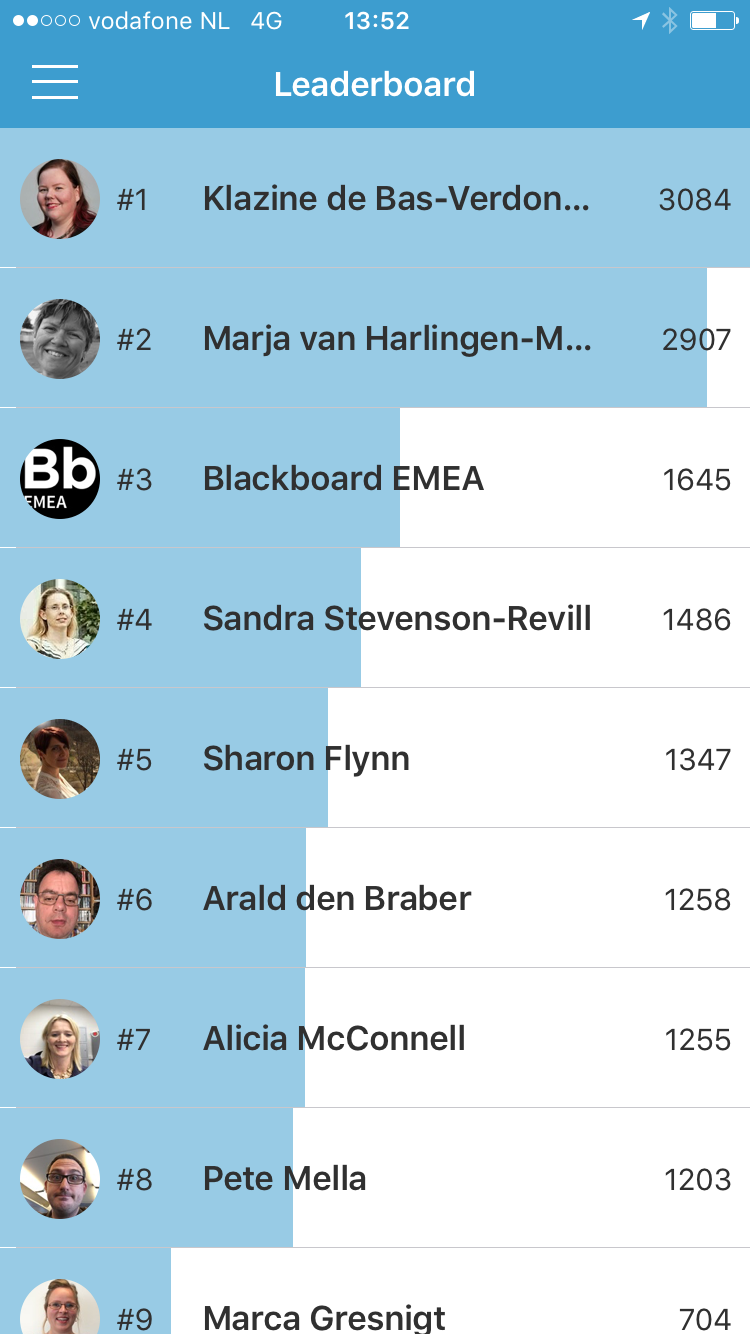
While we were all very busy earning badges, posting pictures of the same powerpoint slide from different angles and distances, we were also earning points. Every activity had an associated point value, though exactly how these were calculated is not clear. Moreover, it was possible to check out the LeaderBoard from within the app. Initially, some of the attendees of DevCon (a pre-conference for developers) were at the top of the board, but before long some of the more competitive types (myself included) started making our way up the board.

It was all a bit of fun. Wasn't it? Until we realised that the activity of "Liking" posts clearly resulted in more points - even Liking your own posts! Something was clearly amiss here. You could barely post anything before it received half a dozen "likes".

At this stage I will state very clearly - I did not start Liking my own updates. Competitition was fierce, though, and it soon became clear that it would not be possible to catch up with the frontrunners.

In the end, I finished a respectable 5th, and I'd like to give a shout out for the two leaders Klazine and Marja who played a very strong game - they left us behind for dust. Kudos also to Pete, Alicia and Sandra - the latter sneaked ahead of me on the last day. What does it say that 13 of the top 20 positions were taken by women?

Final Comments

Certainly the app was useful and fun, and the gamification brought a new community experience to the conference - though possibly not what was intended. It was a shame that the backchannel was closed, but I think this could be easily remedied by improving the ability to publish to twitter at the same time.

The gamification was interesting. How points were allocated is not clear, but it seems that the allocation needs to be rebalanced a little bit, to encourage more activity with added value.

Tuesday, 17 November 2015

The 5 x 12 apps of Christmas

12 Days. 12 Apps. 10 minutes per day.

I've just signed up (again) for the 12 apps of Christmas #12appsDIT offered by the Learning, Teaching and Technology Centre at DIT, and facilitated by Frances Boylan. This was launched last year (and I blogged about it at the time) based on a similar initiative at Regent's University London.

Each morning over 12 weekdays, starting Dec 1st 2015, a page will be released that reviews a particular mobile app and explores it in terms of how it could help students personalise their learning. Like an advent calendar, every day you open a new door and see what's behind it.

This year the DIT folk are focussing on personalisation of learning, and are inviting teaching staff and students to take part. Already more than 600 people have registered. Why not sign up too?

As well as #12appsDIT, Chris Rowell of Regent's University London, has launched Christmas 2.0 #RUL12AoC.
Aimed at academic and academic support staff, this open course offers to cover the basics and some more advanced tips on using 12 educational apps.

You can sign up for the RUL course, which is offered via Blackboard's Open Education platform.

Meanwhile, the University of West London has also launched their 12 apps of Christmas open course #UWL12Apps. This course aims to inspire you to explore how you can use your smartphone or tablet in education and beyond.

In case 3 apps per day isn't enough for you, the University of Brighton has also launched a satellite cMOOC of #RUL12AoC, with hashtag #12brightapps.

So, starting on 1st December, with a new app (or 4) every weekday until 16th December, you could learn about the educational possibilities of up to 48 apps. At that stage, we could all do with a rest!

Update (18 November): Thanks to Chrissi Nerantzi (@chrissinerantzi) for alerting me (in the comments below) to another 12 apps  offered by Manchester Metropolitan University Library. This course, which does not need any registration, promises engaging hands-on activities, top tips and support from expert facilitators. Staff at MMU are also encouraged to participate in #RUL12AoC for the experience of an online course, with a suggestion that a common hashtag #12AoC is used.

That's a potential 60 apps, although I suspect there'll be a certain amount of overlap.

Friday, 14 November 2014

Making CPD fun - the 12 apps of Christmas

I've just signed up for this initiative - the 12 apps of Christmas - offered by the Learning, Teaching and Technology Centre at DIT, and facilitated by Frances Boylan. Based on a similar programme led by Chris Rowell at Regent's University London, this looks like a fun approach to continuous professional development and kudos to the LTTC team for implementing it.

The video on the site gives an overview of what is going to happen. Starting on Monday 1st December, and continuing for 12 working days until Tuesday 16th December, an app will be considered each day. According to the video, there will be a short demonstration of how the app might be used in a teaching and learning context, and there will be an optional exercise.

Like an advent calendar, there is a sense of excitement about what might be behind the next door!

Already there is an active twitter stream using the hashtag #12appsDIT, and numbers signed up for the event have reached 260. No doubt there'll be many more by the start of the course.
I'm hoping to find out about some new, useful apps and to learn more about embedding them in teaching practice.

12 Days. 12 Apps. 10 minutes per day.